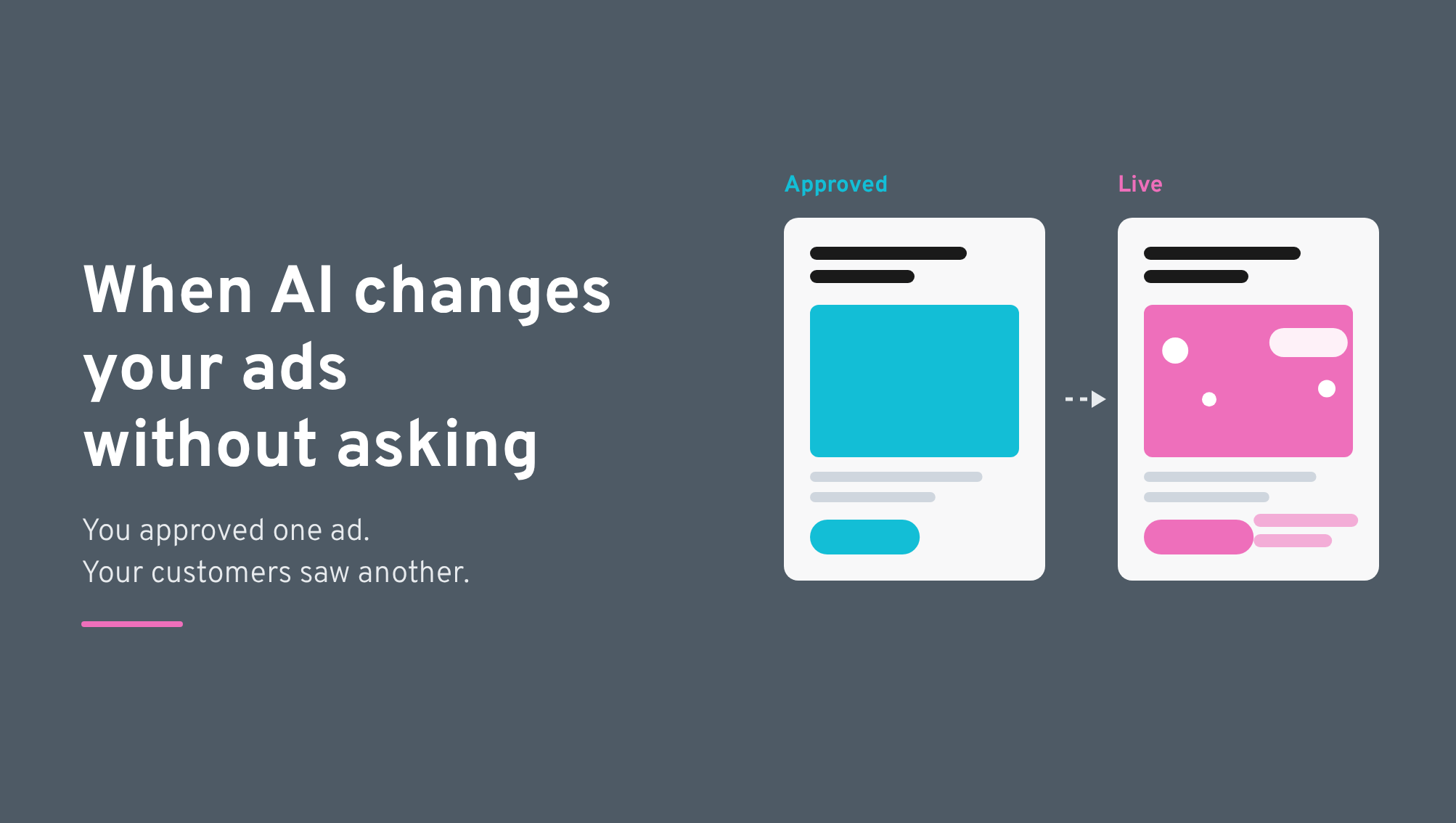
On the weekend of October 17, 2026, Bookshop.org found itself apologizing for an AI-altered ad running under its name. The company, which doesn't use AI-generated artwork, said Meta had modified the ad without its knowledge after an account update opted it into new advertising features.
Customers had no way of knowing what happened behind the scenes. They saw AI-generated creative from a brand they trusted, and the criticism landed squarely on Bookshop.org.
The same thing could happen to any brand advertising on Meta, Google, or other platforms introducing automated AI features. You can approve every image, headline, and campaign detail, only for the platform to change what goes live. And when customers notice, they're not questioning the platform's settings. They're questioning your brand.
Some AI features are enabled by default and can reactivate after being switched off, including following routine campaign edits. We've seen this firsthand in client accounts, where enhancements disabled during quality assurance have switched back on after something as simple as a headline change.
That means even a thorough approval process isn't always enough. Advertisers need to know what their platforms are changing, when those changes happen, and how to keep control of the creative their customers actually see.
Meta and Google offer AI features that can alter approved ads, sometimes without advertisers realizing those features are active. Some are enabled by default. And, as we've seen in Meta accounts, switching them off doesn't guarantee they'll stay off after an edit.
Creative approval therefore needs to go beyond the original artwork and copy. Teams should review the variants a platform can serve, check settings after changes, and make someone responsible for the final QA.
There's room for AI in that process. The important thing is knowing what you're letting the platform decide.
Yes, as shown with Bookshop.org, and it’s a growing concern for brands. With certain AI features enabled, the ad a customer sees may differ from the version your team signed off. Meta's Advantage+ creative enhancements can adjust uploaded images, video and text. Google's AI Max and creative enhancements introduce their own forms of automation, affecting everything from ad copy to destinations.
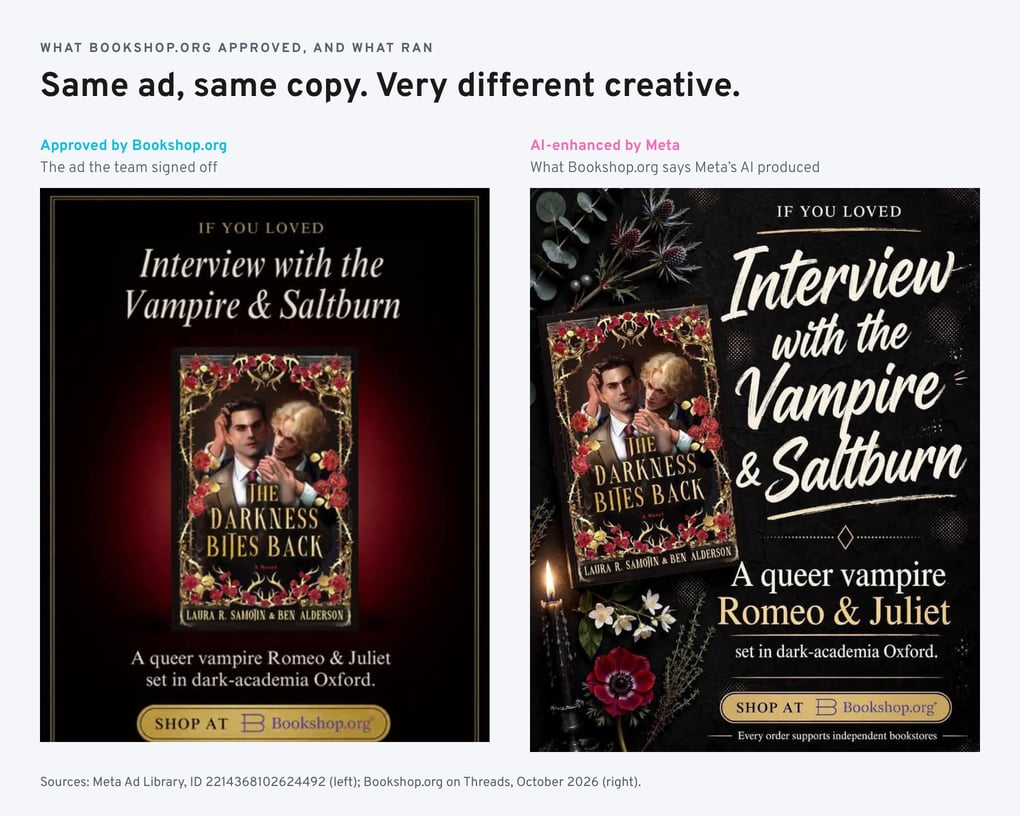
The ad Bookshop.org approved (left) and the version it says Meta's AI produced (right). Sources: Meta Ad Library; Bookshop.org on Threads, October 2026.
These tools don't all carry the same risk. It's useful to separate the ones that inform your team from those that change creative or delivery.
| Kind of platform AI | Examples | What it changes | Our approach |
|---|---|---|---|
| AI that informs decisions | Performance forecasts, keyword research, recommendations | Information available to your team | Use as decision support, and verify recommendations before acting |
| AI that changes customer-facing creative | Meta Advantage+ enhancements, automatic translations, related media, AI summaries, Google text and video enhancements | The creative customers see | Keep unapproved enhancements off; test deliberately with creative review |
| AI that changes delivery or destinations | Personalized destinations, Google's final URL expansion, search term matching, and audience expansion | Who sees ads or where traffic goes | Evaluate against business goals, with controls for unsuitable destinations and audiences |
The most public mistakes tend to involve creative. In June 2026, Meta's AI altered an REI bicycle ad, producing an image with an extra handlebar. REI told Fast Company that Meta had automatically enrolled the company in an AI personalization tool. As REI pointed out, a two-handled bike wasn't something customers could buy from them.
Other changes are harder to spot. A generated headline might describe your offer accurately but miss the problem your campaign is meant to solve. An older image could appear in the wrong campaign. A website summary might pull in details that are true but have nothing to do with the message you chose.
Aaron Ward, our Media Director, has seen this with AI-generated website summaries:
"The summary doesn't have full context on the brand, the services, the offerings. Now there's just additional text generated by AI that's distracting from the core message you're trying to get across."
The extra text may look harmless on its own. But if it distracts from the approved message, the platform has changed the job the ad was meant to do.
Turning off an enhancement isn't always the end of it. Clients have asked us why unwanted AI features show up in campaigns their teams already checked. We've encountered the same issue in managed accounts and have now strengthened our QA process as a result. Here's how unwanted AI features can find their way into your campaigns.
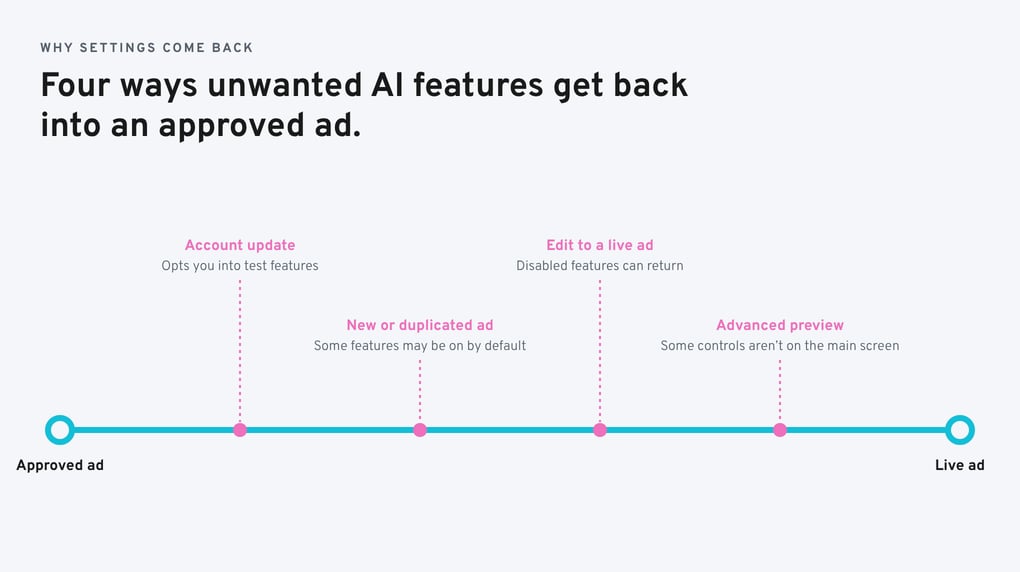
Bookshop.org said an account update opted it into new Meta advertising features without its knowledge. Meta also offers an account-level option to test creative features that are still in development. That setting is separate from the standard enhancements on individual ads, so reviewing one ad won't tell you everything the account may allow.
Meta says some creative features may be enabled by default when an ad is created. A duplicated ad can also inherit settings that deserve another look. Treat each new or copied ad as a fresh QA task, even when the underlying creative has already been approved.
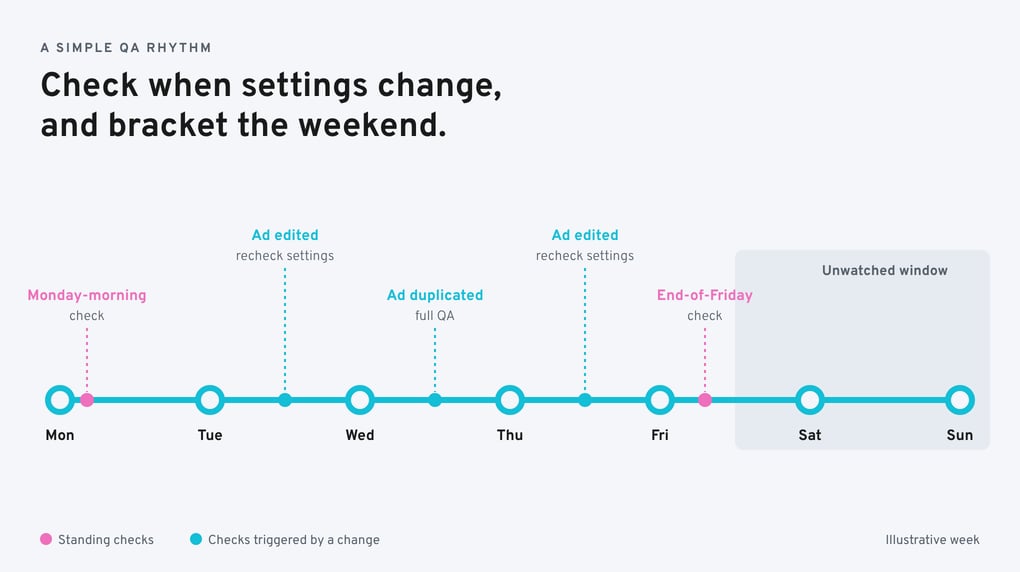
Recheck AI creative settings after every edit, even if you switched them off earlier.
We've seen disabled enhancements return after ordinary edits to client ads. A request to change a headline, for example, has sent our team back into settings we'd already checked. We don't know whether this is a wider platform bug, and we wouldn't claim it happens every time. We do know it happens often enough to make another settings review part of our final QA.
Meta says some enhancements can be disabled only in Advanced preview, rather than the main ad creative settings. If someone checks one screen and stops there, they may miss what else Meta can do to the ad.
There's a timing problem too. Bookshop.org's issue surfaced over a weekend, when many teams aren't watching their accounts. Checking on Friday and again on Monday helps limit how long an unexpected change might run. It won't catch everything, especially a platform update that happens in between, but it's a practical addition to checks after edits.
A distorted product image is an obvious problem. Other consequences are less visible, particularly to the people accountable for brand reputation and media investment.
Your positioning depends on showing up consistently. Every unapproved creative variation is another chance for the message to drift, even after your team has spent months refining it.
People see the brand on the ad, not the history of its approval settings. In a Talker Research survey commissioned by Auros, 43% of Americans said they'd felt duped by AI advertising, and 36% associated its use in marketing with lower product quality. Those figures don't mean every customer objects to AI. They show why careless customer-facing use can carry a reputational cost.
When a platform changes the creative, audience or destination, it's harder to know which decisions produced the outcome. A higher click-through rate might look promising, until you discover the clicks came from less relevant people or landed on pages that weren't ready to convert.
It's part of the problem we explored in The Automation Paradox: automation makes campaigns easier to run, but can make the decisions behind their results harder to explain.
And there's no guarantee that adding AI will improve the ad itself. In research published in Harvard Business Review in September 2026, Syracuse University's Adam Peruta compared AI-generated and human-made video ads from major brands. Viewers struggled to tell the difference, but the AI-generated versions performed worse on measures of short-term sales potential and long-term brand equity.
That study looked at fully AI-generated ads, not individual Meta or Google enhancements. It doesn't prove those enhancements perform poorly. It does give advertisers reason to question the idea that more AI is automatically better, especially when speed or efficiency comes at the expense of the finished work.
Ad platforms can optimize quickly because they have enormous amounts of performance data. What they don't have is the full context behind your marketing decisions. They may know which ad earns a click without knowing why your team prioritizes a particular audience, how you position against competitors, or what's changing inside your business.
Google's AI Max is a useful example. For Search campaigns, it can broaden search term matching, generate ad text and expand final URLs to pages Google considers relevant. In the right circumstances, those options may help.
But whether those features are useful depends on what's happening within the business. We recently spoke with a client who was keen to follow Google's recommendation to use AI Max. However, with a new website launch approaching, Aaron advised against it. AI Max relies on website content, landing-page selection and established performance data to optimize campaigns. Introducing it just as the website was about to change would waste the budget without delivering meaningful results.
It's a good example of why platform recommendations need to be evaluated alongside what's happening in the business, rather than accepted at face value.
Audience recommendations deserve the same scrutiny. Testing another segment may sound sensible, but it can also divide a limited budget between your primary market and a less responsive audience. Before expanding, ask what you're trying to learn and whether the spend can support a meaningful test.
A platform can suggest an optimization. Your team still has to decide whether it serves the business.
Our paid media team starts with the audience, the competitive landscape and the result the client needs. That informs the creative and messaging before we decide which platform tools have a useful role.
As Aaron puts it:
"Really strong brand messaging that resonates with a consumer pain point, or an outcome they want, is going to perform much better than an AI feature that's just distracting from that core message."
Strong creative gives the technology something worth amplifying. Automated additions shouldn't distract from that work.
You don't need to manage every campaign setting by hand. You do need a clear view of what the platform can change, who approves those changes and how the results will be judged. For the person leading marketing, I'd ask the account team to make five commitments.
1. Know which AI features are enabled. Ask for a current account-level review across Meta, Google and other channels with meaningful spend. Include creative features as well as targeting and destination changes. For every feature that's on, the team should be able to explain why.
2. Approve what can actually run. Don't stop at the original artwork or copy. Review the variations the platform is permitted to generate and, where possible, the creative it actually serves. Keep a record of approved settings, but remember that a screenshot of those settings isn't proof of every version customers saw.
3. Recheck after changes. Make AI settings part of QA after every ad edit, new or duplicated campaign, and significant platform update. Add Friday and Monday checks where appropriate. Higher-spend or more sensitive campaigns may need closer monitoring.
4. Make someone responsible. Whether it's an in-house specialist or an agency partner, the final check needs an owner. That's the same thinking behind fixing ownership before scaling a marketing budget: when responsibility is assumed rather than assigned, details get missed.
5. Judge AI by the outcome. Test promising features with a clear purpose and appropriate controls. Qualified leads, acquisition cost or revenue contribution may matter more than clicks. A lift in engagement isn't much use if the feature changes the brand message or attracts the wrong audience.
None of this is expensive. It's repetitive, which is exactly why it gets skipped.
We use AI for research, analysis and other work where it adds value. Customer-facing creative deserves a different level of review, because the brand is accountable for whatever goes live.
You can manage Advantage+ creative enhancements in Meta Ads Manager, but not every control appears in the same place. The options also vary by account and ad format. Whoever manages the account should run through these checks:
Meta's help documentation covers creative defaults and enhancements within Advanced preview. Because these interfaces change, confirm the current menu labels in your account before relying on a saved checklist.
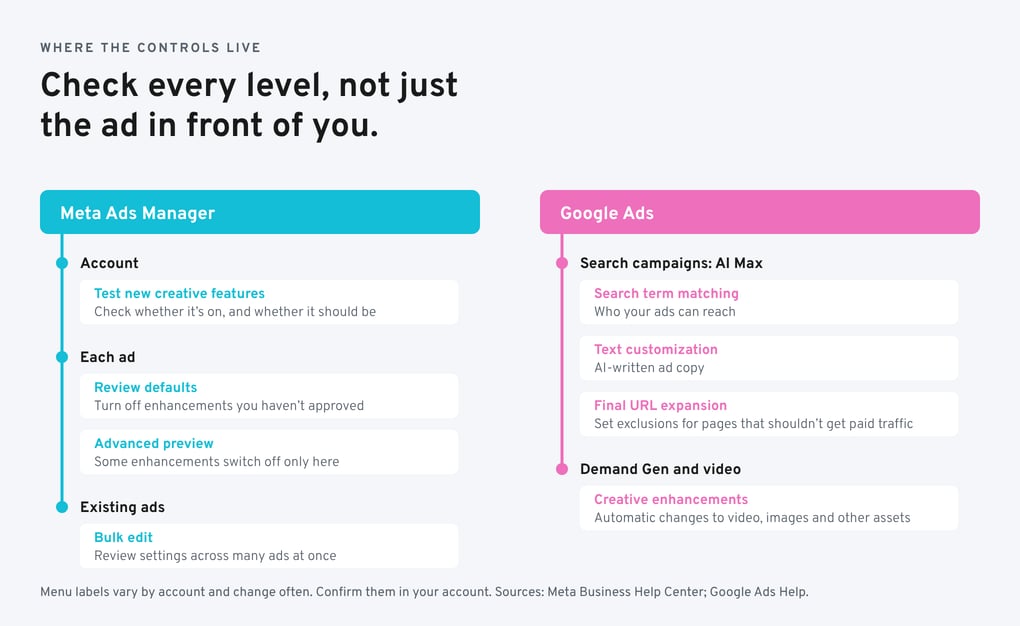
Google has a different set of controls. In Search, check AI Max's search term matching, text customization and final URL expansion. If you use URL expansion, set exclusions for pages that shouldn't receive paid traffic. In Demand Gen and video campaigns, review the available automatic changes to video, images and other assets.
Google's creative enhancements documentation explains the available controls, while its AI Max documentation outlines settings for new and existing Search campaigns.
These checks aren't about disabling useful automation for its own sake. They're about making sure the changes are understood and approved.
First, find out what changed. Pause or correct affected ads, then review other live campaigns for the same settings. Establish whether the issue came from an account update, a default enhancement or something missed during approval. If customers are raising concerns, explain what happened, what you've fixed and what you'll do differently.
Bookshop.org's response offers a useful example: the company acknowledged the altered creative, explained Meta's role and apologized to its customers.
Then update the process. Record the affected ads and settings, check whether other campaigns face the same risk, and change the QA steps accordingly. Spotting an unwanted enhancement once may be unavoidable. Repeatedly missing the same one shouldn't be.
You shouldn't have to know every switch inside Meta or Google. But your media team should be able to tell you what those switches can change, and what they're doing to protect approved work.
Start with four questions:
If the answers are vague, you've found your risk before your customers did.
AI can make campaigns work faster and help uncover worthwhile opportunities. But the platform doesn't know your business as your team does, and it won't be answering your customers if something goes wrong.
There are plenty of advertising decisions worth automating.
What goes into market under your brand shouldn't be left to an unnoticed default.
To stay up to date with the latest in Marketing and AI, subscribe to our newsletter below.
Not with one universal switch. Meta's account-level option to test new creative features covers features still in testing, while standard enhancements may need to be reviewed individually or through supported bulk edits. Check each new ad as well; an earlier approval doesn't cover new settings.
Not necessarily. Disclosure requirements vary by platform, feature and location. Google has indicated that some AI-modified assets carry labels in certain jurisdictions. But you shouldn't rely on a label to explain an unexpected change: most customers will associate the ad with the brand running it.
The first account audit takes the most effort. After that, the review can sit inside the process you already use for launches, edits and reporting. Add an AI-settings check to the change-request checklist and ask your media partner to report on exceptions or changes.
Yes. Switching off unapproved creative changes doesn't mean your team can't use AI for research, analysis, forecasting or development. The distinction is whether AI helps people make informed decisions or changes the work customers see without appropriate review.
The better the data you look at, the better the decisions you'll make.