Last updated: May 2026
If you launched a website and then walked away from it, you're already losing customers you'll never know about. Website maintenance and optimization is the ongoing work of keeping your site fast, secure, accessible, and aligned with your business goals: software and security updates, performance and Core Web Vitals tuning, accessibility audits, content refreshes, and conversion experiments, on a schedule. This 2026 playbook covers what maintenance actually includes, how often each task needs to happen, what optimization looks like in practice, and how to know when your retainer is earning its keep.
What website maintenance and optimization includes:
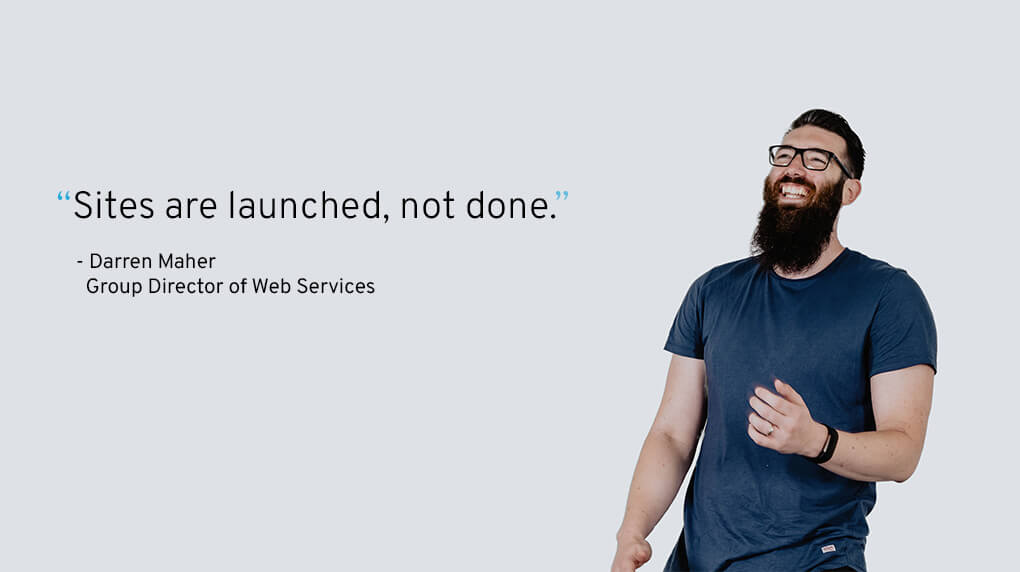
"Sites are launched, not done." That's the line we've been repeating to clients for years, and it still gets at the heart of why maintenance matters. Most companies treat a website launch as the finish line. The companies whose sites quietly compound revenue year after year treat launch as the start of the real work.
Okay, your site isn't actually alive. But if you treat it like it is, by giving it proper care and maintenance, you'll significantly enhance its effectiveness. Your business is dynamic. It advances and adapts. Your website should mirror that, evolving to support growth and changes. Regularly revisiting performance, user experience, functionality, and content keeps the site aligned with where the business is going, not where it was the day you launched.
Leaving your site as-is may feel cost-effective in the short term. It's not. The cost of a neglected site shows up as a brittle codebase, a security incident, a Google ranking drop, or a full rebuild three years sooner than you needed one. Investing in regular maintenance is a small price compared with rebuilding from scratch after compounding problems take the site down.
.jpg?width=1020&height=572&name=Reasons%20why%20-%20laptop%20surrounded%20by%20tools%20(1).jpg)
A website's primary job is to convert. Without ongoing maintenance, the site quietly drifts out of alignment with what users expect: pages get slower, forms get buggier, mobile layouts break against new device sizes. When the experience degrades, conversion drops, and lost lead generation is no good for sustained growth. Customer behavior isn't static either, which is why optimization is an ongoing process and not a one-and-done deal.
Paying attention to your website consistently over time leads to:
There's no one-size-fits-all answer. Frequency depends on the size, complexity, and functionality of your site, the volume of content updates, the regulatory environment of your industry, and the criticality of the site to your business. A small content site has very different needs from a B2B platform connected to a CRM and a quoting tool.
A good place to start: monthly maintenance audits, with quarterly and annual rhythms layered on top. We treat ongoing maintenance at Major Tom as a strategic retainer, not a support ticket queue, because proactive work prevents the costly emergency fixes that show up otherwise. Below is the cadence we recommend for most business sites:
| Cadence | Tasks |
|---|---|
| Monthly | Core, plugin, and dependency updates. Security scans. Backup verification. Broken-link sweep. Uptime and form-submission checks. |
| Quarterly | Core Web Vitals review (LCP, INP, CLS). Accessibility audit against WCAG 2.1 AA. SEO content refresh on top-traffic pages. Conversion path review and a CRO experiment. |
| Annual | Structural and information-architecture review. Tech stack audit. Brand and content consistency pass. Full accessibility and security audit. Roadmap for the next 12 months. |
There will always be slight variations for custom builds, Squarespace, and WordPress maintenance, but this cadence holds for most retainers. Use it as your guiding north star.
Outdated, rarely-updated websites don't help the people who matter most: your customers. A site that isn't updated gets boring fast, becomes harder to use, and slips in search rankings. Keeping it current is crucial if you want it to work for you, not against you.
We stay ahead of the curve so we can apply the latest patterns to custom website work. Sites that read as modern, functional, and considered are the ones existing customers return to and new ones explore. Our ongoing work on Copperleaf's website is a great example of this as is Mark Anthony Group's multi-brand retainer work which has kept their family of sites consistent in quality even as the portfolio has grown.

Cybercrime keeps climbing, and websites are prime targets. Hackers look for the path of least resistance, and it doesn't matter how big your business is. What matters is whether you've left a door open. A breached site can mean downtime, lost customers, stolen data, and real legal exposure, all of which cost money.
Two security-related shifts every site owner should know about:
With regular maintenance, we take a proactive approach: identify and patch weak points, monitor suspicious activity, and keep software current so vulnerabilities don't sit open. We also verify backups regularly so a clean restore is always an option. A secure site protects the business and signals trust to the customers using it.
Maintenance keeps the site secure and functional. Optimization makes the experience of visiting it better, through data-driven changes that compound over time.
When it comes to websites, every second counts. A site that isn't actively maintained gets slower; new media, new tags, new scripts pile up, and performance drifts.
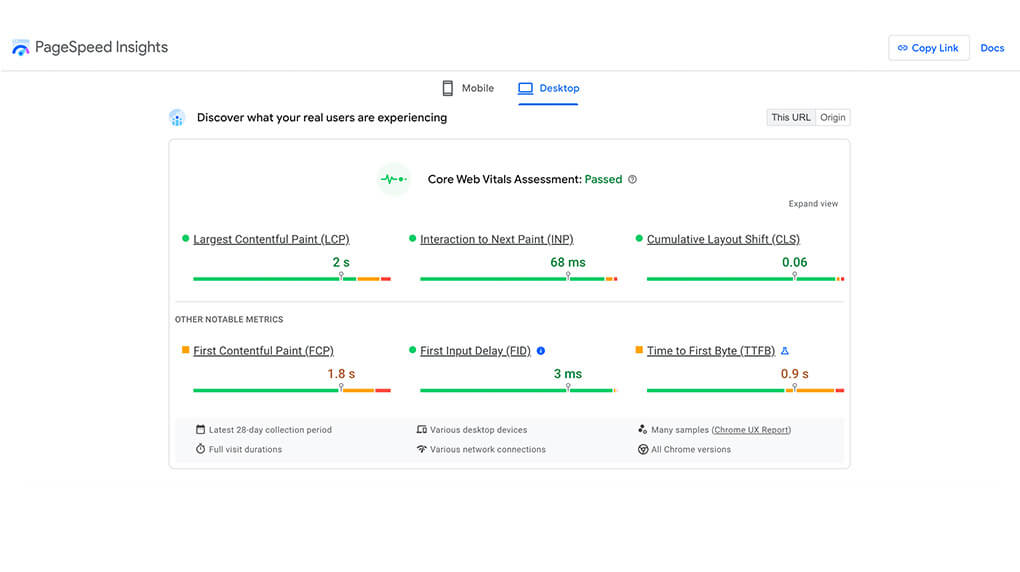
The metric set has changed since Core Web Vitals first rolled out. Interaction to Next Paint (INP) replaced First Input Delay as a Core Web Vitals metric on March 12, 2024 (Google Search Central). The "good" threshold is INP under 200 ms. INP is more demanding than FID was, because it measures every interaction, not just the first one, so sites that passed CWV before may be failing now without realizing it.
The usual suspects when speed degrades:
Monitor the metrics, identify the bottleneck, fix it, and repeat. Fast sites convert better, retain users longer, and rank higher.
Speed isn't the only experience metric that matters. Functionality, responsiveness, and accessibility are equally important, and equally vulnerable to drift.
Mobile devices account for 53.65% of global web traffic versus 46.35% on desktop (StatCounter, April 2026). An unresponsive site that looks great on desktop but breaks on mobile is losing the majority of its audience by default. Quarterly responsive checks across real device classes (not just resize tests in a browser) are the only reliable way to catch this.
Accessibility deserves the same treatment. WCAG 2.1 AA compliance touches contrast, alt text, form labels, focus states, keyboard navigation, and ARIA semantics, and all of it tends to degrade over time as new content is added without governance. Pair quarterly automated scans with periodic manual audits, and you'll catch issues before they become regulatory or reputational problems. See our guide to accessible web development for the foundations.
As the digital landscape evolves and algorithms update, ongoing SEO upkeep is non-negotiable. The shift in 2026 is that "search" now covers both Google's traditional results and AI answer engines: AI Overviews, ChatGPT, Perplexity, and similar tools. Content that ranks well also tends to be the content that gets quoted by these systems, but only when it's structured for clarity.
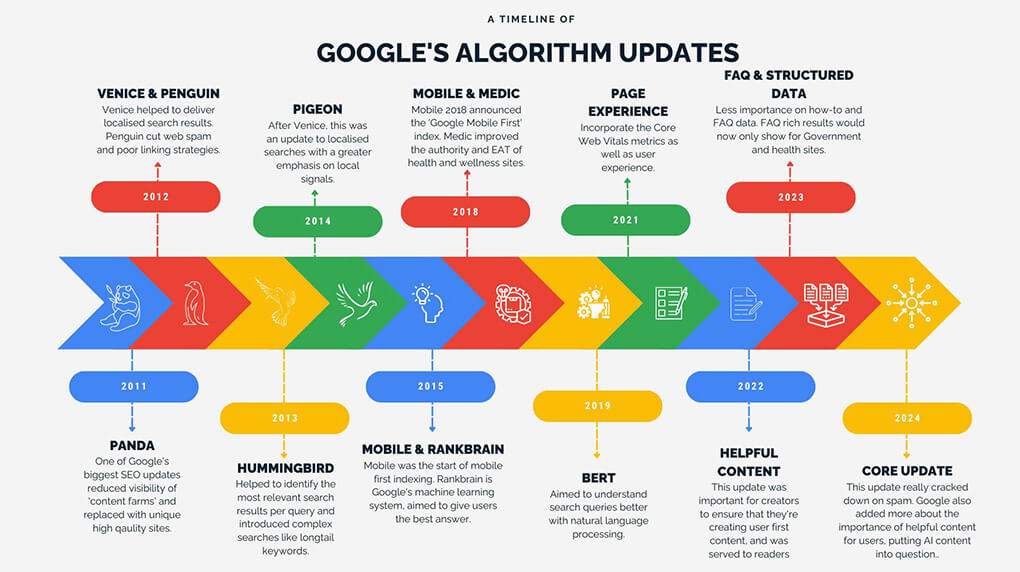
Our ongoing SEO and AEO checklist for retained clients:
This is the work that makes an industry-leading website hold its position. Without it, a strong launch slowly turns back into an average site.
Staying on top of the work above is what keeps a business growing. Regular maintenance and audits ensure your site meets the changing objectives of the business and the evolving needs of the audience.
.jpg?width=1020&height=572&name=holistic%20approach%20-%20Lady%20working%20on%20laptop%20(1).jpg)
Your audience isn't the same as it was 5-10 years ago, and the data your site collects is the best proof. As the world evolves, customer expectations rise. Their preferences, values, and behaviors shift. Ongoing maintenance and optimization let you adapt to that reinvigorated audience as the signals come in, so your website can evolve with your customers instead of falling behind them.
We can't stress this enough: nothing beats real-life data and feedback for figuring out what's working and what isn't. By monitoring performance metrics and running regular customer surveys, you can rethink, reprioritize, and redesign elements based on what the data is telling you. Choose the KPIs that make sense for your business, then track, analyze, and improve. Just remember, if your customers don't like your website, how happy you are with it is irrelevant.
Maintenance gets harder, not easier, as a site grows. Multi-brand portfolios, integrations with CRMs and PIMs, large content teams, and regional variants all add complexity that a small retainer can't absorb. For enterprise scenarios, the disciplines and tradeoffs we cover in complex website usability issues for large-scale organizations are the right starting point.
Maintenance is one piece of the puzzle. A website built for longevity is another. A flexible design system makes it easier to maintain features without disrupting the experience, and a scalable information architecture lets the site adapt as the business grows. Together they're a force to be reckoned with.
By making maintenance and optimization part of your ongoing strategy, you sidestep the problems and costs that neglect creates. Instead, you reap the benefits a well-strategized site delivers: faster performance, better user experience, higher lead generation, and more conversions. If you're trying to find clarity in the chaos of vendors, tools, and competing priorities, we can help you build a retainer that actually moves the numbers.
Explore our web design and development services, or get in touch to talk through what your site needs next.
Website maintenance covers the ongoing work that keeps a site secure, fast, and functional: CMS and plugin updates, security monitoring and patching, SSL renewal, data backups, broken-link sweeps, uptime and form-submission checks, accessibility audits, and basic content updates. Optimization sits alongside maintenance and adds Core Web Vitals tuning, SEO and AEO refreshes, CRO experiments, and improvements driven by user-behavior data. Together they keep a site competitive over years, not months.
Most business sites need monthly software, security, and backup work, quarterly performance and accessibility audits, and an annual structural review. High-traffic, eCommerce, and regulated sites typically need more frequent monitoring and quarterly CRO experiments on top. There's no single right answer; the cadence should match the complexity of the site and the risk of downtime, but monthly is the floor. Treat maintenance as a retainer, not as ad-hoc tickets, and the cost-per-issue drops dramatically.
Maintenance is the work that keeps the site functioning as built: updates, patches, backups, broken-link fixes, uptime monitoring. Optimization is the work that makes the site perform better than it did before: speed improvements, accessibility upgrades, content refreshes for SEO and AI answer engines, CRO experiments, and UX adjustments based on user data. Maintenance protects the investment. Optimization grows the return. Most retainers should include both.
Pricing varies widely based on traffic, complexity, integrations, and how much optimization is bundled with the maintenance. Small content sites can be maintained on modest monthly retainers. Enterprise and eCommerce sites with multiple integrations and regular CRO experiments require materially larger budgets. The honest answer: cheaper retainers tend to be reactive, more expensive retainers tend to be proactive, and proactive work nearly always costs less over a two-year horizon than the emergency fixes it prevents.
Unmaintained sites get slower, less secure, and less competitive. Plugins fall out of date and become attack surface. SEO rankings drift downward as Google rewards faster, better-structured sites. Forms break silently. Accessibility regresses as new content is added without governance. Eventually, the cost of catching up exceeds the cost of a rebuild, and you face a choice between an expensive emergency fix and an even more expensive replatform. Either is worse than steady, ongoing care.
Core Web Vitals are Google's user-experience metrics: Largest Contentful Paint (LCP, loading), Interaction to Next Paint (INP, responsiveness; replaced First Input Delay on March 12, 2024), and Cumulative Layout Shift (CLS, visual stability). They influence search rankings and correlate with user satisfaction. Maintenance matters because Core Web Vitals drift downward as new media, scripts, and content are added. Quarterly tuning keeps thresholds in the "good" band: LCP under 2.5 s, INP under 200 ms, CLS under 0.1.
Yes. Accessibility regresses faster than most teams realize. Each new page, image, form, or component is a chance to introduce a contrast, alt-text, or focus-state issue. Building a quarterly WCAG 2.1 AA audit into your maintenance retainer catches problems early, before they accumulate into a costly remediation project or, in regulated jurisdictions, a legal one. Pair automated scans with periodic manual testing using keyboard-only navigation and screen readers for the most reliable coverage.
It's much more fun to be interested than interesting.