Last updated: May 2026
Complex website usability is the discipline of keeping a large, fast-growing site easy to use as the organization behind it gets more complicated. Enterprise sites tend to fail in six predictable ways: functionality that no longer matches business goals, structure that hasn't scaled with growth, poor UX, confusing navigation, accessibility gaps, and unoptimized performance. Each problem compounds the others. The fix isn't a fresh coat of paint; it's a strategic redesign that combines user-centered architecture, modern performance baselines, and a continuous improvement loop. Here's how to diagnose enterprise website usability problems and fix them at scale.
The six most common enterprise website usability problems:
The organic growth of a website over time is a beautiful thing. Unmanaged growth is the opposite. Most enterprise sites we audit have three or four of the six problems above sitting on top of each other, quietly draining conversions and trust. This guide walks through how to spot each one, what a strategic revamp looks like for a large organization, and the technical decisions (CMS, integrations, performance) that determine whether the new site holds up for the next ten years or limps to year three.
Enterprise website usability is harder than mid-market website usability for one reason: complexity compounds. New product lines arrive, new audiences are added, new stakeholders ask for new pages, and integrations multiply. Each addition is reasonable in isolation. Together, they slowly transform a clean site into a confusing one.
Neglect compounds too. Smart organizations treat website usability as a continuous discipline, not a launch-day metric. When we audit enterprise sites at Major Tom, the pattern is almost always the same: small, deferred maintenance decisions accumulate into a structural problem that a quick fix can't address. By that point, the only honest answer is a strategic revamp.
Usability is measured across four dimensions:
If any of the four is in poor shape, the other three can't fully compensate. Regular maintenance and optimization keep all four healthy between major revamps; ignoring them is why most enterprise sites need a full rebuild every three to five years instead of the eight to ten they could otherwise last.
Each of these six problems can individually undermine a site's effectiveness. Together, they push users away, frustrate internal teams, and quietly cap your conversion ceiling. We see them most often as a cluster, not in isolation.

When the site's functionality lags the business, users can't complete the tasks you want them to complete. Externally, that looks like abandoned carts, half-finished forms, broken search, and dead-end product pages. Internally, it looks like a content management system so painful to use that your team avoids updating it.
Great functionality saves your in-house team time, lifts conversion for your customers, and signals that the brand still invests in itself. When functionality lags, both groups feel it within weeks.
As the company adds products, business units, audiences, or regions, the information architecture has to absorb each addition without becoming a maze. Most enterprise sites we see have absorbed five years of "let's just add another page" without ever stepping back to rationalize the structure. The result: unrelated content arbitrarily linked, longer-than-necessary user journeys, and a steady drip of 404 errors as old pages get orphaned.
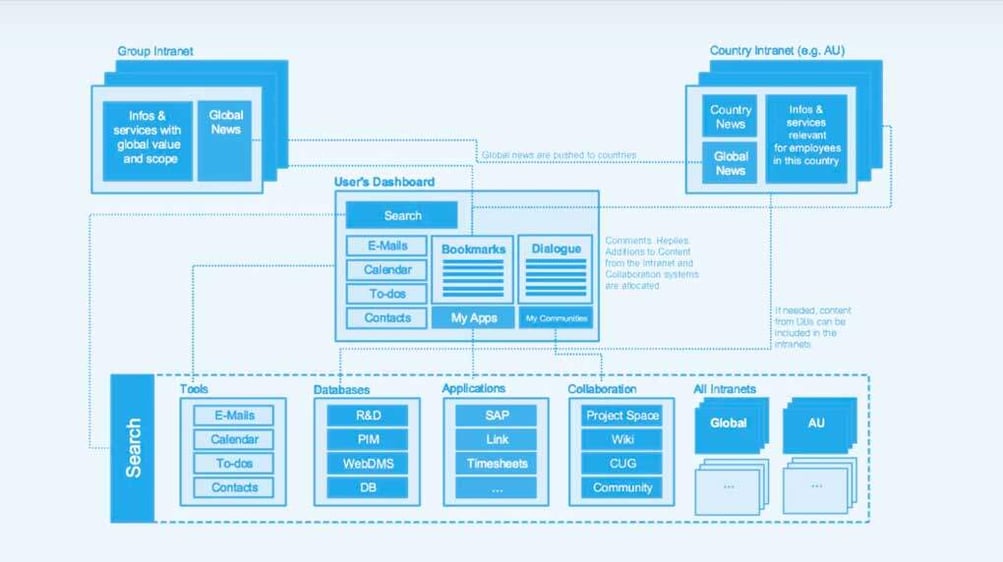
The cost isn't only human. A site Google can't index cleanly loses search visibility, and as AI answer engines (Google's AI Overviews, ChatGPT, Perplexity, Claude, Grok) increasingly surface answers directly, a tangled structure becomes harder for them to quote too. A well-organized site structure helps visitors, Google, and the next generation of AI assistants all at once.
Poor UX takes many shapes: cluttered layouts, low page responsiveness, unexpected interaction patterns, unclear instructions, inconsistent components from page to page. Each looks small. Together they accumulate into a site that's exhausting to use, even when no single page is obviously broken.
Great UX uses intuitive logic to eliminate friction. It frames everything around what the user is trying to accomplish, then strips away anything that doesn't help them get there. When we audit large sites, the gap between "works" and "delights" is almost always a UX problem masquerading as a content or design problem.
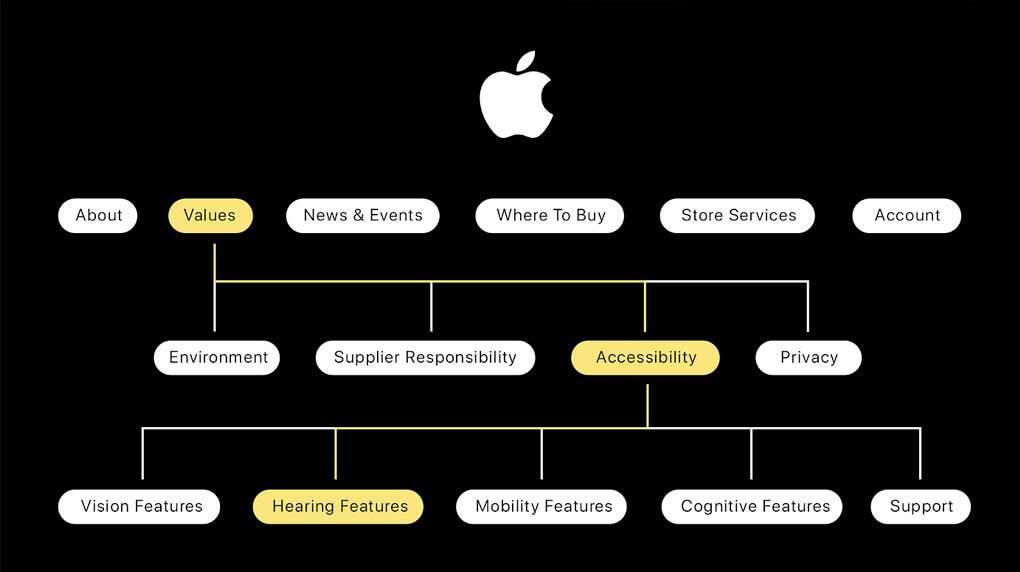
Navigation is where cognitive overload first shows up. Drop-down menus stuffed with twelve top-level categories, mega-menus that change shape between sections, breadcrumb trails that lie about hierarchy: any of these push the user's brain past the point of useful decision-making. Bounce rates climb. So does the share of users who give up before they reach a product page.
Intuitive navigation does the opposite. It minimizes extraneous cognitive load so users can spend their attention on the reason they visited. The benchmark we apply at Major Tom is simple: from any page on the site, can a user reach any other page in three clicks or fewer? If not, the IA needs work.
Accessibility problems exclude paying customers and create growing legal exposure. The scale of the problem industry-wide is striking: WebAIM's 2026 analysis of the top 1 million home pages found that 95.9% had detectable WCAG 2 failures, averaging 56.1 accessibility errors per page, with low-contrast text (83.9%), missing alt text (53.1%), and missing form labels (51%) leading the list. Plaintiffs filed 3,117 federal website accessibility lawsuits in 2025, a 27% jump from 2024.
Under the DOJ's Title II final rule (as amended April 2026), state and local government web content and mobile apps must conform to WCAG 2.1 Level AA by April 26, 2027 for entities serving 50,000+ people, and April 26, 2028 for smaller entities and special districts. For private-sector enterprises, that bar is the de facto standard your lawyers will measure you against.
Resolving accessibility at enterprise scale isn't a one-day audit. It means making accessibility a continuous practice across design, development, content, and QA. Our deeper playbook on the practical side is in our guide to accessible web development. The business case is straightforward: more visitors served well means more business done, and fewer surprise legal letters.
The modern user has no patience for a slow page. Mobile devices account for 53.65% of global web traffic versus 46.35% on desktop, which means a poorly optimized mobile experience is the experience for most users, not an edge case.
Google's Core Web Vitals now hinge on Interaction to Next Paint (INP), which replaced First Input Delay as a Core Web Vitals metric on March 12, 2024. The "good" threshold is INP under 200 ms. Enterprise sites with heavy JavaScript bundles, third-party scripts, and aging CMS templates frequently fall into the "needs improvement" or "poor" buckets without realizing it. When that happens, search visibility drops and the human experience drops faster.
The "Is my site marketable?" question is best answered with data. Our digital marketing assessment walks through the diagnostic. Performance, accessibility, and mobile-readiness all weight heavily.
Two ambient forces accelerate every problem above. First, your customers themselves evolve. Their devices, expectations, and patience all shift, often faster than the procurement cycle that funds a redesign. The truth is your web presence has to evolve with them or it stops resonating.

Second, content itself ages. Old product pages linger, broken page elements accumulate, and compatibility issues creep in as browsers update. Modern web design trends, technical requirements, and Google algorithms keep moving; a static site falls behind without anyone making a decision to fall behind. A carefully designed revamp, properly maintained, can extend the useful life of your site well past industry average.
A website that doesn't live up to its full potential isn't neutral. It's actively working against the brand, training repeat visitors to expect friction. The triggers we see most often in inbound enterprise briefs:
None of these is "the site looks dated." They're all symptoms of structural misalignment between the site and the organization. A redesign is the right answer when the symptoms cluster.
Solutions to enterprise usability problems exist. None of them happen overnight. The work is to combine a user-centric philosophy with the technical and operational discipline a complex site demands. When we approach enterprise web projects at Major Tom, we look at the website and the business holistically: information architecture, content strategy, design system, performance budget, accessibility standards, and the in-house workflows the site will need to support after launch.
That holistic approach is what produces work that lasts. Our IPEX site, for example, went on to win a Web Excellence Award; our Spud site picked up two Gold W3 Awards. Both are enterprise builds in highly different sectors (industrial pipe systems and online grocery), and both succeeded for the same reason: the team treated complexity as a design problem to be solved, not a feature to be tolerated.
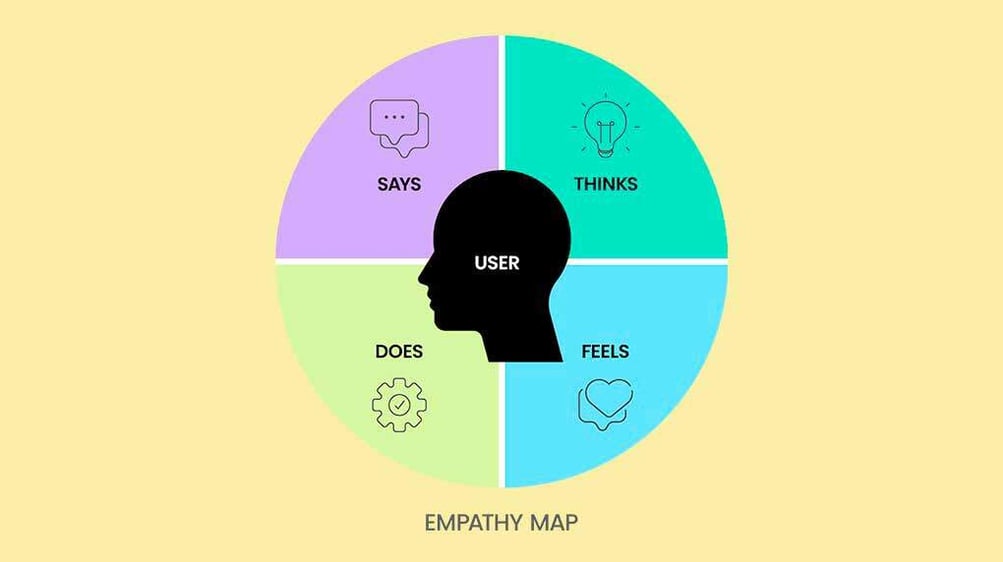
Place user behaviors, expectations, and goals at the center of the design process. The shift is from product-centric ("look at what we sell") to user-centric ("here's how you get what you need"). The most successful enterprise sites we ship frame everything around the audience first.
The reason is simple. Prioritizing intuitive navigation makes it easy for users to find what they need; well-designed engagement elements move them toward the action you want. Success is measured by how much usability improves, not how many bells and whistles ship at launch.
Modern enterprise sites need to feel current without making users relearn the web. We apply a "use what works" principle: lean on familiar components (cards, accordions, breadcrumbs, mega-menus) but style them in a way that's distinctively your brand. The end goal is the Aesthetic-Usability Effect: a site that looks good is perceived as more usable, which gives you goodwill on small frictions.
Where it makes sense, we incorporate current patterns:
Any of these can lift the site toward industry-leading status when applied with discipline. Applied without it, they become the next round of usability debt.
Enterprise complexity isn't a job for any single specialism. UX designers, content strategists, developers, accessibility specialists, and SEO leads all see different facets of the same problem. We work in multidisciplinary teams precisely because brainpower is better combined than siloed.
Your team is also one of the most important inputs. You know your business best; you know how customers actually use the site, what the in-house operations look like, and where the political constraints sit. That's why we involve clients (and, where useful, their customers) in the process. For more on the client side of that collaboration, see our companion guide on how clients avoid the three classic mistakes in web development projects.
When solving complex usability issues, simplicity is the goal even when the underlying system is intricate. The power of simplicity is that it reduces user cognitive load, so attention goes to the task, not the interface. Modern enterprise design reduces complexity by focusing on what matters: clear, concise, straightforward interactions. Simplicity only looks simple once the hard work is done.
A website isn't done at launch. Optimum performance requires continuous improvement and ongoing maintenance. Using data to drive decisions (rather than gut feeling) is the only reliable path to compounding gains.

Monitor performance metrics regularly, gather user interaction data, and treat the post-launch period as the start of the project, not the end. An underperforming page isn't only losing present conversions; it's robbing you of the compound growth that small, repeated improvements deliver over time. Even a modest lift in a key conversion rate compounds across years. For an operational playbook on the post-launch side, see our guide to taking a lead generation site from underperforming to ever-improving.
Strategy carries you most of the way. Two technical decisions determine whether the strategy actually lands at scale: the CMS you choose and how you integrate third-party platforms.
The CMS is the backbone of an enterprise site: the backend software that lets non-technical teams create, manage, and modify content without writing code. Different CMS platforms suit different organizations. The right one depends on your content workflows, integration needs, team skill set, governance requirements, and total cost of ownership over three to five years.
Don't choose a CMS based on what your team already knows. Start from objectives and audience needs, and let the platform decision fall out of those. Familiarity matters, but it shouldn't outweigh fit. (For a closer look at one common CMS comparison, see our breakdown of WordPress vs. Drupal.)
When a site grows beyond its current capabilities, third-party platforms (CRM, marketing automation, eCommerce, search, reviews, analytics, personalization) extend functionality without rebuilding from scratch. Most of the time, you can't predict every integration you'll need in three years. Partner with an agency that will plan, document, and test integrations for long-term health and security so the integrations don't become tomorrow's surprises.
An experienced partner will also propose regular review and testing schedules so integration issues surface before they escalate. Seamless integration with the rest of your stack is what turns a website from a brochure into operational infrastructure.
Enterprise websites aren't static. They're dynamic, complex, and looking deceptively simple from the outside, just like the large organizations they represent. If you want to keep increasing ROI, build a scalable information architecture that prioritizes usability, design, and performance, then maintain it as a living programme.
If you're trying to find clarity in the chaos of an aging enterprise site (rebuild, replatform, revamp, or rethink), we can help you make the call. Ready to solve complex website usability at scale? Explore our web design and development services or reach out to start the conversation.
Six problems dominate enterprise website usability: functionality that no longer aligns with business goals, information architecture that hasn't scaled with growth, poor UX (cluttered layouts and inconsistent components), confusing navigation, accessibility gaps, and unoptimized performance. They almost always show up as a cluster rather than in isolation. A strategic revamp diagnoses all six together, then addresses them through a user-centered redesign, modernized CMS, and continuous post-launch optimization.
The strongest signals are clustered, not single. Watch for flat or declining conversions despite stable traffic, a CMS your in-house team avoids updating, a business that has materially changed without the site reflecting it, accessibility or performance falling behind industry standards, and information architecture that's become more expensive to patch than to rebuild. When three or more of these are true, a strategic revamp typically beats incremental fixes on both cost and outcomes.
Start by mapping every user goal and the journey associated with each, then rebuild the information architecture around those journeys rather than around the company org chart. Limit top-level navigation to the categories most users actually need; offload secondary content to in-page modules or contextual links. The benchmark we apply at Major Tom: from any page on the site, a user should be able to reach any other page in three clicks or fewer.
Website usability is a subset of user experience. Usability measures how easily users can complete tasks (navigation, clarity, efficiency); UX is the broader sum of how interacting with the site feels (usability plus emotion, brand perception, and accessibility). Strong usability is necessary for strong UX but not sufficient. Enterprise teams sometimes optimize for usability metrics and miss the larger UX picture; both need to be designed for, together.
Treat accessibility as a continuous practice, not a launch-day audit. Bake WCAG 2.1 AA criteria into design system components, build accessibility checks into the CMS authoring flow, and run quarterly automated and manual audits across the live site. With WebAIM finding 95.9% of top home pages have detectable WCAG 2 failures and federal lawsuit filings up 27% year on year, "ship and inspect" no longer works. Continuous practice is the only model that scales.
There's no single right answer; the right CMS depends on your content workflows, integration needs, team skill set, governance requirements, and total cost of ownership. Don't choose based on what your team already knows. Start from objectives and audience needs, and let the platform decision follow. Common enterprise paths include WordPress at the higher end of its capabilities, Drupal for governance-heavy environments, and headless setups when content needs to ship to multiple front ends.
Core Web Vitals are Google's measurement of real-user experience: largest contentful paint, interaction to next paint (INP), and cumulative layout shift. INP replaced first input delay in March 2024, with a "good" threshold of under 200 ms. Enterprise sites with heavy JavaScript bundles and aging templates frequently fall into the "needs improvement" tier without realizing it. Failing CWV hurts search rankings and, more importantly, hurts human users on mid-range devices.
Design with community in mind, innovate with technology at heart, and drive business success by finding the sweet spot where they all converge.